
 Talos Cluster
Architecture
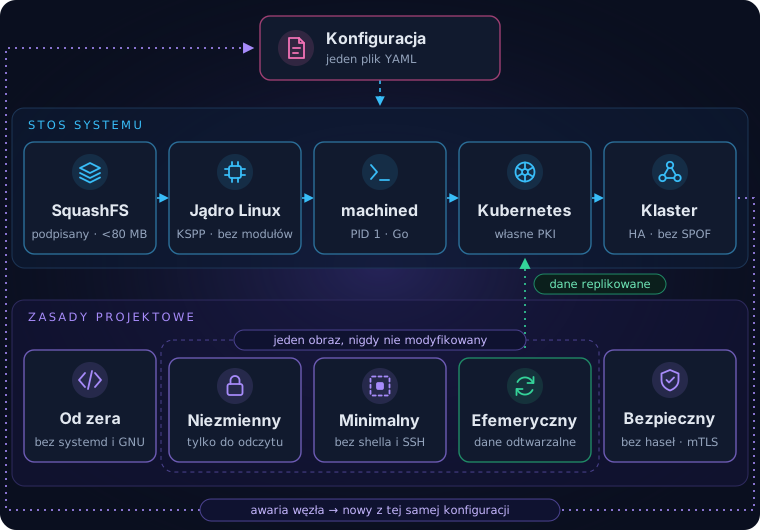
Talos Linux takes a completely different approach to system management than traditional Linux distributions. One of its core principles is immutability. There is no way to log in to the system over SSH. The only way to interact with the system is through its API, used by dedicated tools or IaC. This single difference has a huge impact on day-to-day operations: individual packages cannot be installed or updated, because the system is delivered as an image.
System diagnostics
The primary tool for interacting with a Talos cluster is talosctl. It provides live access to logs and to current resource usage, such as CPU, memory, disks and network. This article presents a few examples of how to use it. More details can be found in the documentation and by experimenting with talosctl -h.
To browse the list of system objects that can be queried with talosctl get, use:
talosctl get rdDashboard
talosctl provides an interactive terminal application (TUI) — the dashboard:
talosctl dashboard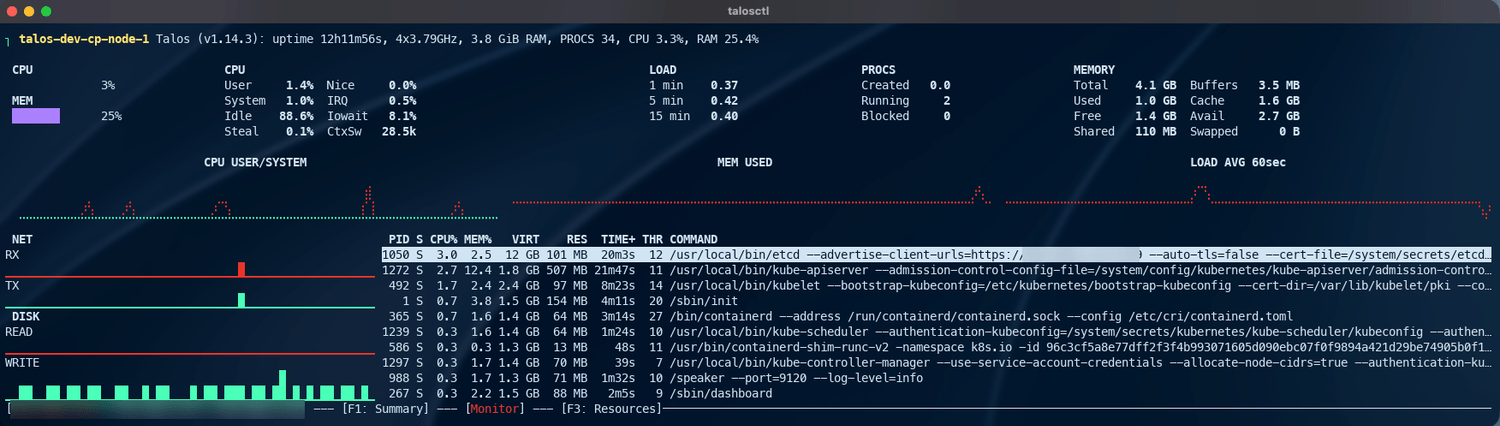
Cluster nodes
The -n option selects the cluster node on which a talosctl command is executed. To list the cluster nodes, run:
talosctl -n 192.0.2.100 get members

NODE            NAMESPACE   TYPE     ID                        VERSION   HOSTNAME                  MACHINE TYPE   OS                ADDRESSES
192.0.2.100     cluster     Member   talos-dev-cp-node-1       2         talos-dev-cp-node-1       controlplane   Talos (v1.14.3)   ["192.0.2.33","192.0.2.100"]
192.0.2.100     cluster     Member   talos-dev-cp-node-2       3         talos-dev-cp-node-2       controlplane   Talos (v1.14.3)   ["192.0.2.34"]
192.0.2.100     cluster     Member   talos-dev-cp-node-3       4         talos-dev-cp-node-3       controlplane   Talos (v1.14.3)   ["192.0.2.35"]
192.0.2.100     cluster     Member   talos-dev-worker-node-1   2         talos-dev-worker-node-1   worker         Talos (v1.14.3)   ["192.0.2.36"]
192.0.2.100     cluster     Member   talos-dev-worker-node-2   2         talos-dev-worker-node-2   worker         Talos (v1.14.3)   ["192.0.2.37"]
192.0.2.100     cluster     Member   talos-dev-worker-node-3   2         talos-dev-worker-node-3   worker         Talos (v1.14.3)   ["192.0.2.38"]
VIP
The example uses the Virtual IP (VIP) configured in the cluster. The address of any cluster node can be used instead.
Logs
Commands for basic system diagnostics:
| Command | Description |
|---|---|
| talosctl -n 192.0.2.33 dmesg | Kernel messages |
| talosctl -n 192.0.2.33 logs machined | Messages from the machined service. The logs of every running service can be read this way (how to list them is described below). |
services
To find out which services are running on a given cluster node, run:
talosctl -n 192.0.2.33 services

NODE           SERVICE                STATE     HEALTH   LAST CHANGE    LAST EVENT
192.0.2.33     apid                   Running   OK       6h29m36s ago   Health check successful
192.0.2.33     auditd                 Running   OK       6h29m46s ago   Health check successful
192.0.2.33     containerd             Running   OK       6h29m46s ago   Health check successful
192.0.2.33     cri                    Running   OK       6h29m35s ago   Health check successful
192.0.2.33     dashboard              Running   ?        6h29m37s ago   Process Process(["/sbin/dashboard"]) started with PID 267
192.0.2.33     etcd                   Running   OK       6h29m11s ago   Health check successful
192.0.2.33     ext-qemu-guest-agent   Running   ?        6h29m46s ago   Started task ext-qemu-guest-agent (PID 232) for container ext-qemu-guest-agent
192.0.2.33     kubelet                Running   OK       6h29m33s ago   Health check successful
192.0.2.33     machined               Running   OK       6h29m46s ago   Health check successful
192.0.2.33     sandboxd               Running   OK       6h29m46s ago   Health check successful
192.0.2.33     syslogd                Running   OK       6h29m45s ago   Health check successful
192.0.2.33     trustd                 Running   OK       6h29m35s ago   Health check successful
192.0.2.33     udevd                  Running   OK       6h29m37s ago   Health check successful
Kubernetes pods
Because Talos is tightly integrated with Kubernetes, talosctl can list the pods running on a given node:
talosctl -n 192.0.2.36 containers --namespace=cri

NODE           NAMESPACE   ID                                                                                IMAGE                                               PID    STATUS
192.0.2.36     k8s.io      default/shy-garlic-5586cc58c7-skv5l                                               registry.k8s.io/pause:3.10.2                        1039   SANDBOX_READY
192.0.2.36     k8s.io      └─ default/shy-garlic-5586cc58c7-skv5l:shy-garlic:9bf7e054571b                    ghcr.io/zatto-dev/shy-garlic:0.13.1                 1520   CONTAINER_RUNNING
192.0.2.36     k8s.io      flux-system/helm-controller-57f4ccf566-w2428                                      registry.k8s.io/pause:3.10.2                        1129   SANDBOX_READY
192.0.2.36     k8s.io      └─ flux-system/helm-controller-57f4ccf566-w2428:manager:b9def4e84060              ghcr.io/fluxcd/helm-controller:v1.5.4               1341   CONTAINER_RUNNING
...
You can also read the logs of a specific application running in Kubernetes:
talosctl -n 192.0.2.36 logs --namespace=cri default/shy-garlic-5586cc58c7-skv5l:shy-garlic:9bf7e054571b

192.0.2.36: 2026-10-17T14:24:22.019684154Z stderr F time=2026-10-17T16:24:22.019+02:00 level=INFO msg="backgrounds directory ready" dir=/data/bg
192.0.2.36: 2026-10-17T14:24:22.132334642Z stderr F time=2026-10-17T16:24:22.131+02:00 level=INFO msg="config loaded" services=16 groups=4
192.0.2.36: 2026-10-17T14:24:22.132365393Z stderr F time=2026-10-17T16:24:22.131+02:00 level=INFO msg="shyg starting" addr=:8080 config=/etc/shygarlic/shygarlic.yaml db=/data/shygarlic.db backgrounds=/data/bg version=0.14.0
...
Disks
Information about the disks in the system:
talosctl -n 192.0.2.38 get disk

NODE           NAMESPACE   TYPE   ID      VERSION   SIZE     READ ONLY   TRANSPORT   ROTATIONAL   WWID   MODEL           SERIAL
192.0.2.38     runtime     Disk   loop0   2         4.1 kB   true
192.0.2.38     runtime     Disk   loop1   2         819 kB   true
192.0.2.38     runtime     Disk   loop2   2         94 MB    true
192.0.2.38     runtime     Disk   sda     2         22 GB    false       virtio      true                QEMU HARDDISK
192.0.2.38     runtime     Disk   sr0     2         4.2 MB   true        ata         true                QEMU DVD-ROM    QEMU_DVD-ROM_QM00002
Details of a selected disk:
talosctl -n 192.0.2.38 get disk sda

NODE           NAMESPACE   TYPE   ID    VERSION   SIZE    READ ONLY   TRANSPORT   ROTATIONAL   WWID   MODEL           SERIAL
192.0.2.38     runtime     Disk   sda   2         22 GB   false       virtio      true                QEMU HARDDISK
Details
To display more information about the selected disk, use the -o yaml option.
Disk layout
You can also list the volumes and mount points in the system:
talosctl -n 192.0.2.38 get volumeconfigs

NODE           NAMESPACE   TYPE           ID                                  VERSION
192.0.2.38     runtime     VolumeConfig   /opt                                2
192.0.2.38     runtime     VolumeConfig   /var/lib                            2
192.0.2.38     runtime     VolumeConfig   /var/lib/cni                        2
192.0.2.38     runtime     VolumeConfig   /var/lib/kubelet/seccomp            2
192.0.2.38     runtime     VolumeConfig   /var/lib/kubelet/seccomp/profiles   2
192.0.2.38     runtime     VolumeConfig   /var/log/audit                      2
192.0.2.38     runtime     VolumeConfig   /var/log/audit/kube                 2
192.0.2.38     runtime     VolumeConfig   /var/log/containers                 2
192.0.2.38     runtime     VolumeConfig   /var/log/pods                       2
192.0.2.38     runtime     VolumeConfig   /var/mnt                            2
192.0.2.38     runtime     VolumeConfig   /var/run                            2
192.0.2.38     runtime     VolumeConfig   /var/run/lock                       2
192.0.2.38     runtime     VolumeConfig   CRI                                 2
192.0.2.38     runtime     VolumeConfig   EPHEMERAL                           2
192.0.2.38     runtime     VolumeConfig   ETCD                                2
192.0.2.38     runtime     VolumeConfig   KUBELET                             2
192.0.2.38     runtime     VolumeConfig   LOG                                 2
192.0.2.38     runtime     VolumeConfig   META                                2
192.0.2.38     runtime     VolumeConfig   STATE                               4
Memory
To check memory statistics on a given node, run:
talosctl -n 192.0.2.38 memory

NODE           TOTAL   USED   FREE   SHARED   BUFFERS   CACHE   AVAILABLE
192.0.2.38     3897    605    2688   104      3         599     3052
Other operations
Netstat
Lists all network connections and their state on a given node:
talosctl -n 192.0.2.38 netstat

NODE           Proto   Recv-Q   Send-Q   Local Address        Foreign Address      State
192.0.2.38     tcp     0        0        127.0.0.1:35238      127.0.0.1:10248      TIME_WAIT
192.0.2.38     tcp     0        0        127.0.0.1:35244      127.0.0.1:10248      TIME_WAIT
192.0.2.38     tcp     0        0        127.0.0.1:7445       127.0.0.1:34146      ESTABLISHED
...
With -k, it additionally shows the full pod name if the connection belongs to a pod:
talosctl -n 192.0.2.38 netstat -k

NODE           Proto   Recv-Q   Send-Q   Local Address        Foreign Address      State
...
192.0.2.38     tcp6    0        0        192.0.2.38:10250     192.0.2.37:14352     ESTABLISHED   -
192.0.2.38     tcp6    0        0        192.0.2.38:50000     192.0.2.34:56754     ESTABLISHED   -
192.0.2.38     tcp     0        0        10.244.4.14:42096    192.0.2.250:80       ESTABLISHED   default/shy-garlic-54fb9db499-gdzjl
192.0.2.38     tcp     0        0        10.244.4.14:44226    188.114.96.3:443     ESTABLISHED   default/shy-garlic-54fb9db499-gdzjl
...
With -l, it shows only sockets in the LISTEN state (here together with pod information):
talosctl -n 192.0.2.38 netstat -kl

NODE           Proto   Recv-Q   Send-Q   Local Address        Foreign Address      State
...
192.0.2.38     udp     0        0        192.0.2.38:7946      0.0.0.0:*                  -
192.0.2.38     udp     0        0        169.254.116.108:53   0.0.0.0:*                  -
192.0.2.38     udp     0        0        127.0.0.53:53        0.0.0.0:*                  -
192.0.2.38     udp     0        0        0.0.0.0:4789         0.0.0.0:*                  -
192.0.2.38     tcp6    0        0        :::8080              :::*              LISTEN   default/shy-garlic-54fb9db499-gdzjl
...
System operations
Selected commands:
| Command | Options | Description |
|---|---|---|
| talosctl -n 192.0.2.33 list | -l / | Lists the contents of a directory on a cluster node (equivalent of ls -l). This is how you can browse the file system. |
| talosctl -n 192.0.2.33 usage /var | -H | Checks how much disk space a directory uses. The -H option shows values in human-readable format. |
| talosctl -n 192.0.2.33 reboot | -/- | Reboots the node |