
HelmChart
For running various applications on a Kubernetes cluster, a HelmChart is available in the repository https://github.com/HomeDevopsLab/appchart. The HelmChart automates and thereby simplifies application deployment. Based on a single HelmRelease object, all Kubernetes resources required to run the application are generated.
This documentation describes each section of the HelmRelease file.
Spec
The spec defines the interval — the period of time that tells Flux how often to run the Helm release reconciliation process. It also defines the Git repository where the HelmChart definition is located.
Versioning
In the Kubernetes cluster, gitrepository objects are pinned to specific versions of the appchart. This allows flexible selection of the application configuration approach and avoids the impact of breaking changes. For example: appchart-320 refers to version 3.2.0.
spec:
  interval: 1m
  chart:
    spec:
      chart: ./chart
      sourceRef:
        kind: GitRepository
        name: appchart-320
        namespace: default
      interval: 1m
Values
nodeSelector
HelmRelease
values.nodeSelector
The nodeSelector determines which group of nodes the application pod will be scheduled on. The distinction is based on the CPU architecture, which allows choosing whether the application runs on a Raspberry Pi or a virtual machine (VM) from Proxmox.
nodeSelector:
  kubernetes.io/arch: amd64
Available options
| kubernetes.io/arch | amd64 | arm64 |
|---|---|---|
| Platform | VM-Proxmox | Raspberry Pi |
K8S Probes
HelmRelease
values.startupProbevalues.livenessProbevalues.readinessProbe
AppChart from version 3.2.0 supports native Startup, Readiness, and Liveness Probes. To use them, simply add them to values following the Kubernetes documentation.
More examples and articles in the table below
| Article / Blog | Level | Key feature | Link |
|---|---|---|---|
| "Practical Guide to Kubernetes Probes" (Civo Blog) | 🟢 Beginner | Very simple NGINX-based demo, ideal as a first look at YAML probe syntax. | Go to Civo Blog |
| "Mastering Kubernetes Probes: Liveness, Readiness, and Startup" (Medium / Steffin Issac) | 🟡 Intermediate | Explains the modern approach, including gRPC-based probes and dependency architecture. | Go to Medium |
| "Kubernetes Probes Deep Dive" (iam-rayees / GitHub) | 🟡 Intermediate | Purely hands-on approach. Shows how to break the application inside a container and observe the k8s reaction. | Go to GitHub/Blog |
| "Kubernetes Liveness Probes: Tutorial & Critical Best Practices" (Octopus Deploy) | 🔴 Advanced | Focuses on how not to kill production with bad timeout values and how to optimize probes for performance. | Go to Octopus Deploy |
replicaCount
HelmRelease
values.replicaCount
ReplicaCount is a very simple parameter. It statically defines how many pods the application should run on. In a home environment this will typically be 1, to save resources. In production environments a higher value can be used to provide more compute capacity and HA.
Tips
It is also worth verifying whether the application can run in this mode. There are cases where a single process cannot have access to the same files at the same time.
replicaCount: 1ServiceAccount
Some applications may need additional permissions within the cluster. For example: an application that reads information about pods in Kubernetes. Such an operation requires setting the appropriate RBAC policies and specifying the name of the service account to use.
# 1. Identity: Create the service account (ServiceAccount)
apiVersion: v1
kind: ServiceAccount
metadata:
  namespace: default
  name: pod-reader-sa

---

# 2. Permissions: Define what is allowed (read pods)
apiVersion: rbac.authorization.k8s.io/v1
kind: Role
metadata:
  namespace: default
  name: pod-reader
rules:
- apiGroups: [""]       # Empty group means the "core" API (e.g. pods, configmaps)
  resources: ["pods"]   # Resource to grant access to
  verbs: ["get"]        # Allowed actions

---

# 3. Binding: Link the service account to the permissions
apiVersion: rbac.authorization.k8s.io/v1
kind: RoleBinding
metadata:
  namespace: default
  name: read-pods-binding
subjects:
- kind: ServiceAccount
  name: pod-reader-sa    # Must match the name of the ServiceAccount above
  apiGroup: rbac.authorization.k8s.io
roleRef:
  kind: Role
  name: pod-reader       # Must match the name of the Role above
  apiGroup: rbac.authorization.k8s.io
The YAML file with permissions (service account and RBAC policy) is placed in the same location as the application's HelmRelease. In the HelmRelease file it is sufficient to specify the name of the service account the application should use.
serviceAccountName: pod-reader-saEnv
HelmRelease
values.env
Environment variables required to run the application.
Plain text definition
- name: foo
  value: bar
Reading a variable value from a secret
- name: foo
  valueFrom:
    secretKeyRef:
      name: app-secret
      key: foo
When using secret-based variables, a secret manifest must be created alongside the HelmRelease configuration file.
apiVersion: v1
kind: Secret
metadata:
  name: app-secret
  namespace: default
type: Opaque
data:
  foo: base64hash
SecurityContext
HelmRelease
values.securityContext
This parameter was introduced to run HashiCorp Vault, which required it to function. It grants the application access to the mlock() function, which prevents sensitive information from being written to disk in unencrypted form.
securityContext:
  capabilities:
    add: ["IPC_LOCK"]
image
HelmRelease
values.image
The image option specifies the container to be run.
image:
  registrySecret: regcred
  imagePolicy: true
  repository: private.registry.address/homelab/documentation
  tag: 2.4.0 # {"$imagepolicy": "flux-system:homelab-doc:tag"}
  command: ["gotenberg"]
  args:
    - --chromium-disable-javascript=true
- --chromium-allow-list=file:///tmp/.*| Option | Required | Description |
|---|---|---|
| repository | Yes | Docker container registry address |
| tag | Yes | Application version. When using imagePolicy, a special Flux comment string must be added after the comment character |
| imagePolicy | No | false image policy off, true image policy on |
| registrySecret | No | Used for private registries that require authentication. The option specifies the name of the secret holding the credentials |
| command | No | Some containers require a custom command to start. The command parameter is of type: list |
| args | No | Additional arguments for command or for the container ENTRYPOINT — whatever is required |
Image Policy
HelmRelease
values.image.imagePolicy
Image policy is a special resource type (CRD) provided by Flux. It is responsible for deploying the latest available tag. The semver pattern is used in the homelab.
policy:
  semver:
    range: ">=0.0.1"
To track versions in the deployment, a special comment must be added to the tag line: # {"$imagepolicy": "flux-system:homelab-doc:tag"}. It specifies the namespace and the name of the ImagePolicy resource to be created.
imagePullSecrets
HelmRelease
values.imagePullSecrets
imagePullSecrets:
  - name: regcred
Works similarly to registrySecret. Although it has a broader purpose by definition, in appchart it is used to create cronJob objects when they need to pull images from an internal container registry.
resources
HelmRelease
values.resources
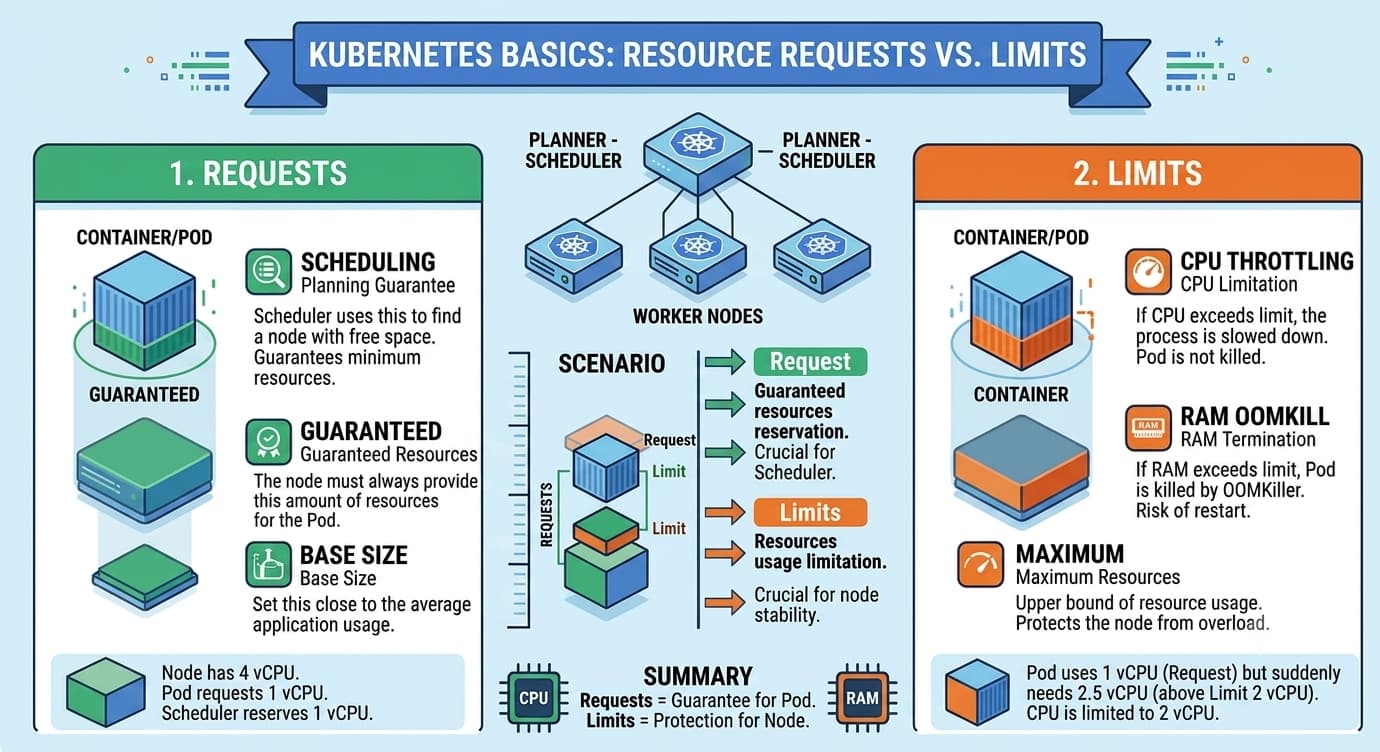
Allows setting CPU and memory limits for the application.
resources:
  limits:
    memory: "512Mi"
    cpu: "1"
  requests:
    memory: "256Mi"
    cpu: "250m"
Requests help Kubernetes select a cluster node capable of running the application — they declare how many resources the application needs to operate. Limits define a hard ceiling that cannot be exceeded. When the CPU limit is exceeded, the application starts running slower — so-called throttling kicks in. When memory runs out, the application is terminated (OOMKill).
services
HelmRelease
values.services
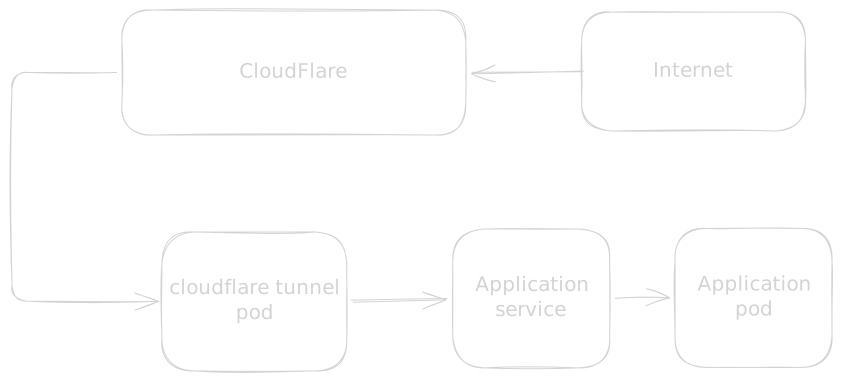
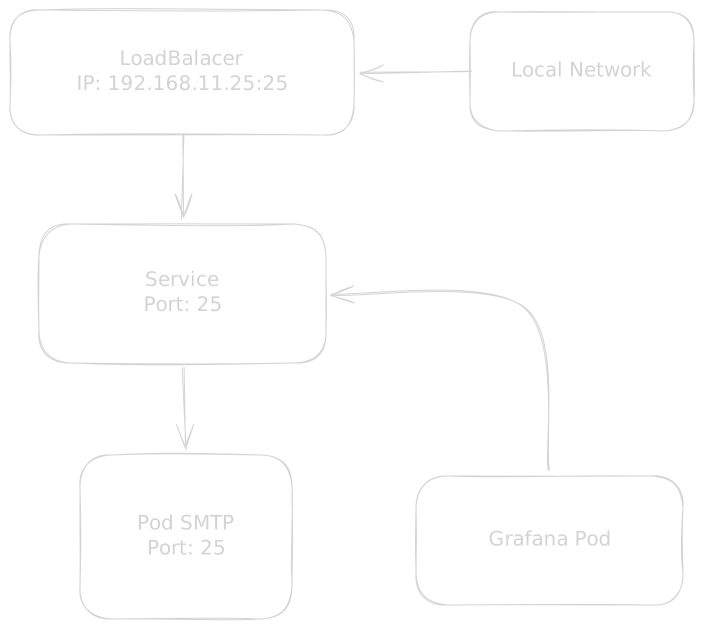
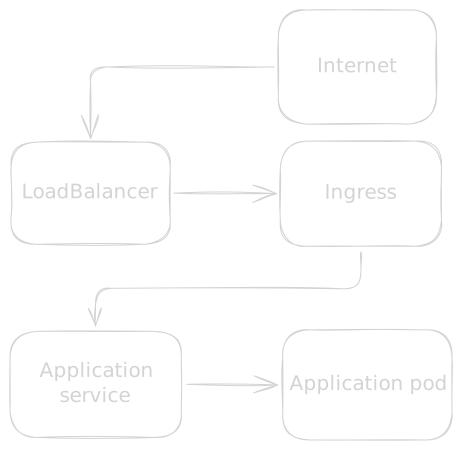
Services handles communication between the application and the environment inside Kubernetes as well as the outside world. A service object can be accessed by another application running in the same cluster or by an ingress. Depending on the type configured, different scenarios can be achieved.
| Use case | Type | Dependent object |
|---|---|---|
| SMTP service | LoadBalancer | LoadBalancer |
| Web app exposed via Cloudflare | ClusterIP | None |
| Web app hosted locally | ClusterIP | Ingress |
Exposing an application via Cloudflare
Internal SMTP service
Application using Ingress
services:
  - name: gitlab
    type: ClusterIP
    protocol: 'TCP'
    servicePort: 80
    targetPort: 80
....| Option | Description |
|---|---|
| name | Service name |
| type | ClusterIP - used for internal communication: service to container. Used for communicating with web servers running in pods. LoadBalancer - maps servicePort to IPs exposed by the load balancer |
| protocol | TCP or UDP |
| servicePort | Port exposed by the service. Used by Ingress (for ClusterIP) or exposed to the LoadBalancer (type: LoadBalancer), allowing e.g. connecting to SSH running in a pod on port 2222. |
| targetPort | Port exposed by the application container |
Service
A single application can have multiple services that need external communication. The best example is GitLab, which has a web server, an SSH server, and a container registry.
Service name
The current version of AppChart has a 15-character limit on service names.
ingress
HelmRelease
values.ingress
Ingress is responsible for serving the web application under a chosen domain address. The latest version of HelmChart allows creating more than one ingress for an application. An example is GitLab, which requires exposing the GitLab GUI and the Docker registry.
ingress:
  enabled: true
  ssl: true
  hosts:
    - name: gitlab.example.com
      servicePort: 80
    - name: registry.example.com
servicePort: 5050| Option | Description |
|---|---|
| enabled | true: ingress installed, false: ingress not installed |
| ssl | true: Let's Encrypt certificate attached, redirect configured, or false: no SSL certificate |
| hosts | array of vhosts. Each vhost is one ingress |
| servicePort | Port number must match servicePort in the service key |
volumes
HelmRelease
values.volumes
Volumes supports mounting several types of resources:
- NFS
- Secrets
- ConfigMaps
Examples
volumes:
  nfs:
    ownership: 991:991
    server: nas.lan
    path: /volume1/data
    mountPath:
      - media:/mnt/media
      - config:/app/config
rootDir: myapp-datavolumes:
secret:
secretName: app-secret
mountPath: /app/secret.json
subPath: secret.jsonvolumes:
configmap:
configMap: app-config
mountPath: /conf/config.ini
subPath: config.iniNFS
| Option | Description |
|---|---|
| server | NFS server address |
| path | path to the exported NFS share |
| mountPath | directory mapping: local-name:path-in-container |
| rootDir | Used when more than one HelmRelease needs access to a shared directory structure |
| ownership | UID:GID of the process that will perform operations on the NFS share |
Important
If the application is to use NFS storage, the directory structure must be created before the application starts. In the example above, run the following command on nas.lan:
mkdir -p /volume1/data/{media,config}Secret
| Option | Description |
|---|---|
| secretName | Name of the secret |
| mountPath | mount path inside the container |
| subPath | name of the file whose content is stored in the secret |
ConfigMap
| Option | Description |
|---|---|
| configMap | Name of the ConfigMap |
| mountPath | mount path inside the container |
| subPath | name of the file whose content is stored in the ConfigMap |